Tesserae Shell
Build your own desktop shell: bars, panels, docks, launchers, on-screen displays and widgets, for KDE Plasma on Wayland. A Tesserae Shell is a few TDL files that say what the screen looks like, a little Python where you want logic, and a rendering engine underneath, the Tesserae Render Engine (tre), which draws every frame on the GPU. The shell runs beside the desktop you already have; it does not replace Plasma, its compositor or its panels.
Pre-alpha
Tesserae Shell is young software. The pages say plainly what is built, what has been tried on a real KWin session and what has not. Keep a way back to your usual Plasma panel.
---
TDL: 0.2
Name: Main_Shell
---
# One Bar along the top of every monitor, with the time at its right end.
Shell {
    Monitor {
        Name: Main
        Index: default
        Children {
            Bar {
                Name: Top_Bar
                Edge: TOP
                Width: EXPAND
                Height: 32
                Style { Background: $color.surface }
                Children {
                    FlexBox {
                        Width: EXPAND
                        Flex: HORIZONTAL
                        Align_Items: CENTER
                        Padding: [12, 0, 12, 0]
                        Children {
                            Spacer { }
                            Clock { format: "%H:%M" }
                        }
                    }
                }
            }
        }
    }
}
Save that as ~/.config/tesserae-shell/Shells/Main_Shell.tdl, run tesserae-shell run, and a bar with a clock appears along the top of every monitor. Save the file again with a change and the bar updates about 200 ms later, without a restart. Getting Started walks through it line by line.
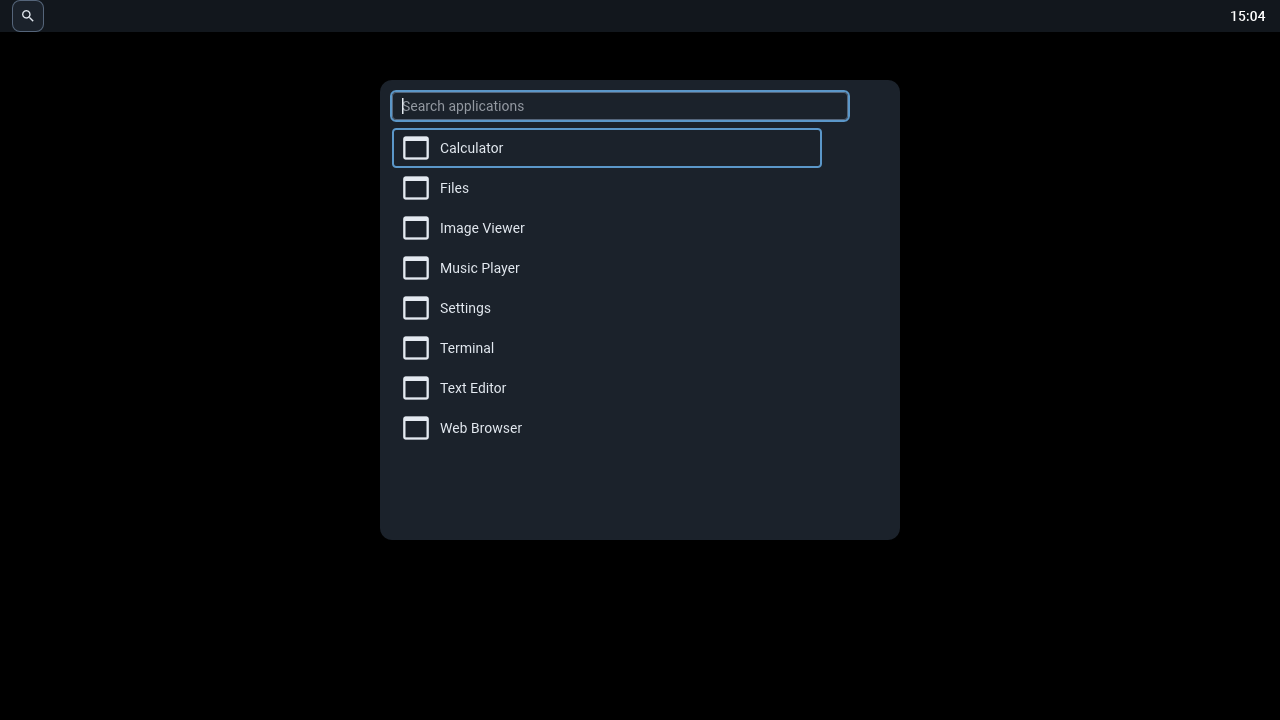
The picture is the shell from the Tutorial, on a test compositor with software rendering; on KWin the look differs a little (fonts, shadows).
What you can build
| Surface | What it is |
|---|---|
Bar |
A strip along one edge of a monitor that keeps its space free of windows, like a panel |
Panel |
An anchored or centred surface: a dock, a launcher, an on-screen display, a widget. It can show and hide, slide, take the keyboard, or join a Bar or a Frame |
Popup |
A menu or a tooltip that opens beside what you clicked or hovered |
Frame |
A ring around the whole output with strips, melded panels and peeking tabs |
Monitor |
Which monitors a set of surfaces goes on: all, one by name, the first, or by description, with hot-plug handled for you |
Inside a surface you put blocks (text, images, icons, boxes, buttons) and modules: ready-made pieces with their own logic. The shell ships a Clock, Battery, Workspaces, Network, Media, Audio, a volume on-screen display, a system Tray, a Task list, the Applications list and Launcher, and text fields, sliders, toggles and menus. A module of your own is a <Name>_Module.tdl with a <Name>_Module.py next to it. Modules lists what ships; Writing a module shows how to write one.
What you get
- Live editing. Save a shell, module, style or icon file and the running shell updates once. A file with an error changes nothing and is reported as
file:line:column. - A real look. Themes with colour, type, shape, space, elevation and motion tokens, light and dark modes that follow your desktop, stylesheets with classes and states, shadows and animation. See Styling and Themes.
- Accessibility. Roles, names and live announcements reach a screen reader; focus and the keyboard work everywhere. See Keyboard and Shortcuts.
- A safe default. TDL files cannot run code. Modules are Python that runs with your rights, so you write them or read them first. See Security and Trust.
- A way to check.
tesserae-shell checkvalidates every file without a compositor, and the same checks run in your own scripts and tests.
Where to go next
| If you want to | Read |
|---|---|
| Install it and start it with your session | Installation |
| See a first bar | Getting Started |
| Build a whole shell step by step | Tutorial |
| Look up a block, key or setting | Surfaces, Modules, Settings |
| Write a module | Writing a module and the Module API |
| Understand a message | Messages and Troubleshooting |
| Know how it works | Architecture and the Design record |
| Upgrade | Upgrading |
How it fits together
flowchart TB
    files["Your files: shells, modules, styles, themes, settings (TDL and Python)"]
    shell["Tesserae Shell: reads the files, runs the modules, talks to D-Bus, KWin and the sound server"]
    tre["Tesserae Render Engine (tre): layout, painting, animation, input, accessibility"]
    wl["The Wayland compositor (KWin): layer-shell surfaces"]
    files --> shell --> tre --> wl
Rust draws every frame and Python only runs when something happens, so a module never slows a frame. The Architecture page explains the layers.
The other projects
Tesserae Shell is one of several projects that share a style and a few libraries: tre, the rendering engine; Tesserae, a framework for desktop applications; tess_dl, the reader of TDL files; and tess_el, the expression language behind the <| |> slots. The shell does not depend on the application framework.